System Architecture
Overview
|
This documentation uses Claude Code as the example MCP client. However, the architecture is client-agnostic. Any MCP-compatible LLM client or CLI tool can replace Claude Code in this setup. |
This document describes the architecture and deployment of the Maven MCP ecosystem. The system consists of multiple MCP servers that provide LLM clients access to various data sources relevant to Maven development.
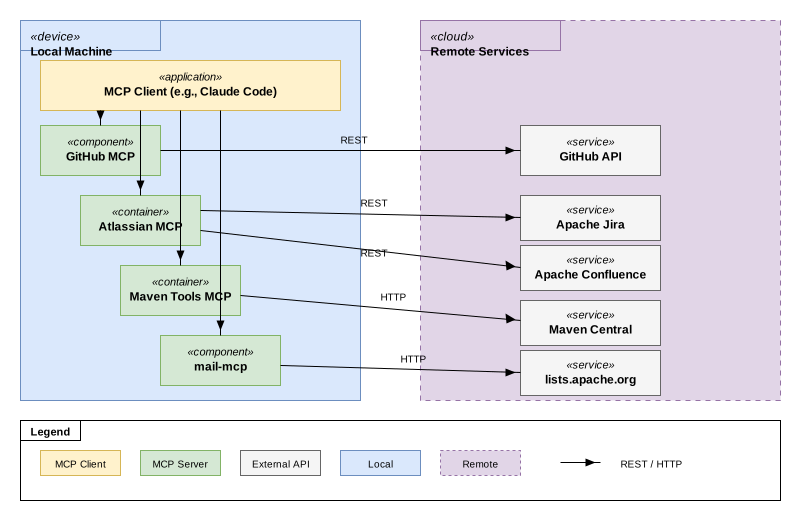
Components
Local Components
These components run on your local machine:
- MCP Client (e.g., Claude Code)
-
The MCP client that connects to all configured MCP servers via HTTP/SSE. Provides the user interface for interacting with the MCPs.
- mail-mcp
-
Locally deployed MCP server providing access to Maven mailing list archives. Clients access mail-mcp only via MCP protocol. See mail-mcp documentation.
- Atlassian MCP
-
Locally deployed MCP server (runs via Docker). Provides access to Apache Jira and Confluence instances. See Atlassian MCPs for available options. Communicates with Atlassian API via REST.
- GitHub MCP
-
Locally deployed MCP server (runs via
npx). Provides access to GitHub repositories, issues, and pull requests. See GitHub MCP documentation. Communicates with GitHub API via REST. - Maven Tools MCP
-
Locally deployed MCP server (runs via Docker). Provides Maven Central dependency intelligence (version lookups, health analysis). See Maven Tools MCP documentation. Communicates with Maven Central repository directly.
Communication
Prerequisites
See Prerequisites for detailed requirements per component.